Automatic parser matching for new log source

28.10.2026
Automatic Parser Matching for a New Source
The automatic parser matching mechanism is used to identify the correct parser for a newly added log source. The system collects a sample of frames from the new source, runs the available parsers against that sample, and then compares parsing effectiveness. The parser that parses the largest number of fields in the largest possible number of frames is selected.
Sources for which the parser has been selected automatically are marked with a flag indicating automatic matching. This makes it possible to distinguish configuration performed by the system from configuration set manually by the user.
Scope of Operation from SV 6.0
Starting from SV 6.0, parser detection is executed in the process responsible for parsing frames, most commonly on the Forwarder. The functionality is not executed on XDRs, because XDR devices are assumed to be fully configured before startup.
- The mechanism applies only to newly added devices, for up to 3 hours from the time they are added.
- Detection parameters are shared by all log sources.
- The system uses one common parser detection and matching mechanism for all sources.
- The algorithm runs in the background on a single thread so that it does not affect parsing performance.
- Sources are queued. After detection is completed for the first source, the system starts collecting logs for the next one.
- If the first 100 frames are parsed incorrectly, the parser is rejected to shorten the analysis time.
Detection Parameters
The table below describes the parameters used during parser detection. Minimum limits determine when analysis may start after a defined time has elapsed, while maximum limits force the detection process to start after a sufficient amount of data has been collected.
| Parameter | Description | Default value |
| MinMemorySize | Minimum number of bytes required to perform detection. | 50 kB |
| MaxMemorySize | Maximum required amount of data accumulated in memory. When this limit is reached, detection starts. | 1 MB |
| MinPackageCount | Minimum number of packets required to start detection after AllowMinimalLevelOverTime has elapsed. | 50 |
| MaxPackageCount | Maximum required number of packets. When this limit is reached, detection starts. | 1000 |
| AllowMinimalLevelOverTime | Time after which the parser will be detected even if maximum limits have not been reached, provided that at least one minimum data level has been reached. | 60 minutes |
| AllowErrorPercent | Allowed percentage of failed parsing attempts. | 10% |
Collecting Data for Parsing
Input data can be delivered to the system in two models. For this reason, the mechanism uses two types of indicators: the number of packets and the amount of data held in memory.
- UDP – the natural frame split: one packet corresponds to one frame. In this model, the MinPackageCount and MaxPackageCount parameters are used.
- Stream – applies to TCP, Readers, and other stream-based sources. In this model, all data may arrive in a single packet, so the MinMemorySize and MaxMemorySize parameters are used.
If any maximum limit is reached, either MaxMemorySize or MaxPackageCount, the detection process starts. The process may take several minutes, depending on the amount of data and the number of available parsers.
If, after AllowMinimalLevelOverTime has elapsed, at least one minimum data level has been reached, either MinMemorySize or MinPackageCount, detection is also started. The maximum time allowed to reach the minimum data level is 3 hours.
Parser Matching Algorithm
Parser matching covers both the parser and device encoding. If VendorName and VendorProduct fields are present in the parsed data, the system uses their first occurrence from the best-matched parser to set the device name.
The simplified mechanism workflow is as follows:
- The system collects a data sample from the new log source.
- Each available parser is used to attempt parsing of the collected frames.
- Results are compared by the number of parsed fields, the number of correctly parsed frames, and the allowed error level.
- The parser with the highest effectiveness is selected as the source parser.
- After the parser is matched, the system sends an informational frame to the device.
Informational Frame After Parser Matching
After the parser is matched, the system generates an informational frame confirming that a new parser has been detected for the log source. An example of parsed fields is shown below.
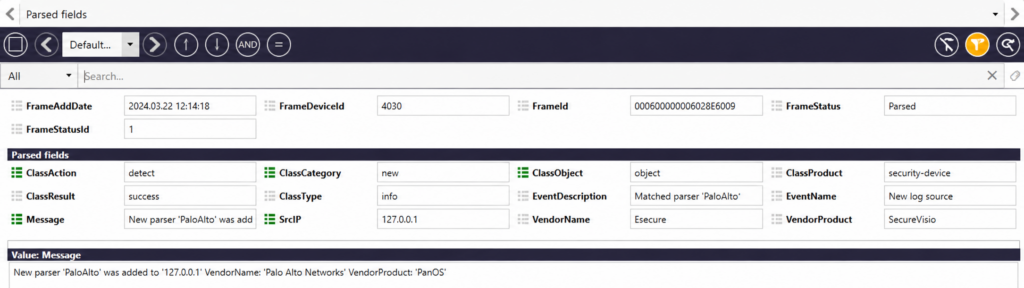
Example informational frame generated after parser matching
The informational frame structure includes a header and a set of parsed fields. The values shown in the table are examples unless the description states that the value is system-built-in.
The informational frame structure includes a header and a set of parsed fields. The values shown in the table are examples unless the description states that the value is system-built-in.
| Informational frame structure | ||
| Header | ||
| Event field | Value | Description |
| FrameAddDate | 2024.03.22 12:14:18 | Frame creation date and time |
| FrameDeviceId | 4030 | Identifier of the newly added device, that is, the new log source |
| FrameId | 00005000060007344EAB | Frame identifier |
| FrameStatus | parsed | Frame parsing status; always equal to parsed |
| FrameStatusId | 1 | Parsing status identifier; 1 – parsed |
| Parsed fields | ||
| Event field | Value | Description |
| ClassAction | detect | Built-in value |
| ClassCategory | new | Built-in value |
| ClassObject | object | Built-in value |
| ClassProduct | application or value from the frame | Value taken from the same frame as VendorName and VendorProduct. If the value cannot be determined from the frame, application is set. |
| ClassResult | success | Built-in value |
| ClassType | info | Built-in value |
| EventDescription | Matched parser ‘PaloAlto’ | Information about the matched parser name: Matched parser ‘{parserInfo.ParserName}’ |
| EventName | New log source | Built-in value |
| Message | New parser ‘PaloAlto’ was added to 172.0.0.1 VendorName: ‘Palo Alto Networks’ VendorProduct: ‘PanOS’ | Information about the matched parser name and source IP address: New parser ‘{parserInfo.ParserName}’ was added to ‘{device.Source}’ VendorName: ‘{parserInfo.VendorName}’ VendorProduct: ‘{parserInfo.VendorProduct}’ |
| SrcIp | 172.0.0.1 | IP address determined according to source type: for a listener, the IP address of the sending source; for a SIEM connector, the IP address declared in the source field without the port number; for XDR, the IP address of the device on which XDR runs. |
| VendorName | Esecure | Manufacturer name Esecure; built-in value |
| VendorProduct | SecureVisio | Product name SecureVisio; built-in value |
Setting Detected Data on the Device
| Detected data will be set on the device only if the user has not configured it earlier. After the detected data is applied, the device is automatically enabled and starts parsing input data correctly. |
Mechanism Diagnostics
The Esecure.Siwb.DataAccess.SysLog.ParserDetection logger set to DEBUG level can be used to analyze the parser detection process.
| <logger name=”Esecure.Siwb.DataAccess.SysLog.ParserDetection”> <level value=”DEBUG” /> </logger> |
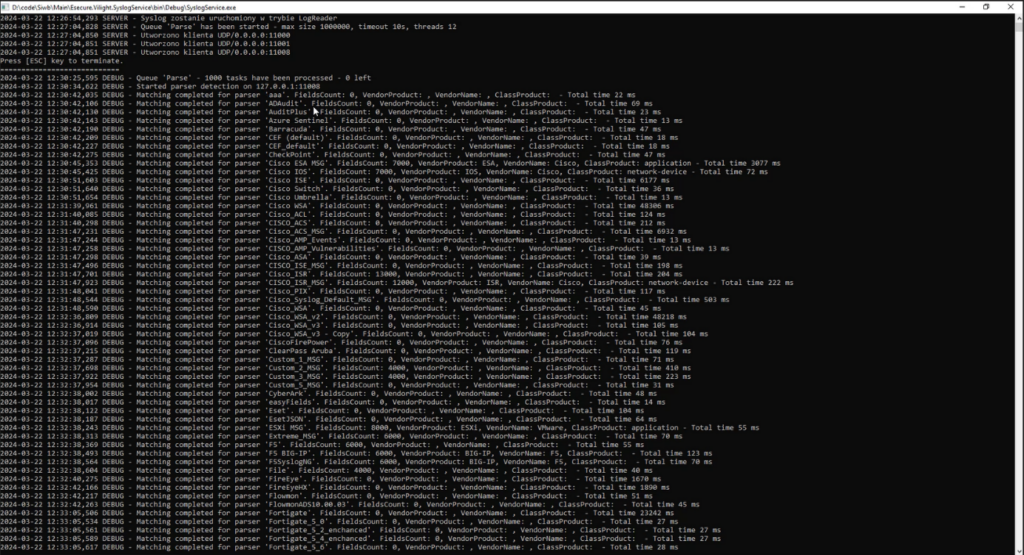
Example diagnostic logs of the parser matching mechanism
Copyright © 2026 Esecure sp. z o.o. All rights reserved. The information contained in this document is current as of the date indicated on the title page. Esecure sp. z o.o. reserves the right to change, modify, or update this publication without prior notice.