Context and AI in incident management. How SecureVisio supports operators in analysing security incidents and automating the response

21.07.2026
Today’s SOCs have to process enormous volumes of security events, which is why the effectiveness of operators depends not only on their experience, but also on the quality of the information available during analysis and on the level of process automation. SecureVisio has been designed to support operators at every stage of incident handling, from classification, through context analysis, to decision making and validation of the actions performed using artificial intelligence mechanisms.
Incident handling in SecureVisio begins with an initial classification carried out by SVBot, i.e. a virtual member of the SOC team. This mechanism analyses the information contained in the event, drawing both on the internal knowledge base and on external threat information sources (Threat Intelligence). This makes it possible to quickly determine whether the log that initiated the incident contains known indicators of compromise (IoC – Indicators of Compromise).
Another element supporting the operator is the UEBA (User and Entity Behavior Analytics) module. It uses five machine learning algorithms to identify deviations from typical behaviour of users and assets, enabling the detection of anomalies that are often the first sign of an unfolding attack.
The CMDB database, referred to in SecureVisio as context, also plays an important role. It is electronic documentation of the IT environment containing technical and business information about all monitored assets. The data gathered in the context is used by the system on an ongoing basis during incident analysis, providing the operator with a complete picture of the situation.
The remainder of the article presents the information stored in the SecureVisio context, the way artificial intelligence is used to automate incident handling, and the mechanisms that support the operator in assessing whether the analysed event constitutes a real security incident or merely a false alarm. The article ends with examples of the real use of the described functions, together with screenshots from the system.
Key takeaways
- Context (CMDB) is the central source of information used during incident analysis.
- The AI Assistant supports operators in summarising events, recommending actions, making decisions and validating the analysis carried out.
- SecureVisio provides multi-layered support that automates the incident handling process and shortens the response time.
Why is context so important?
The CMDB database is one of the most important sources of information in the SecureVisio system. The data gathered in the context has a direct impact on risk analysis, incident prioritisation and the determination of which vulnerabilities and threats should be handled first.
At the same time, the context allows the operator to understand the course of the incident through the presentation of the attack vector. This mechanism shows the full propagation path of the threat, from the source of the attack, through subsequent elements of the infrastructure, to the target asset. As a result, the operator can quickly determine the scope of the incident and the potential consequences of its occurrence.
Every element of the attack vector is interactive and provides immediate access to detailed technical and business information about the given asset. The operator can easily check, among other things, the system owner, the business processes carried out, the criticality level or the relationships with other elements of the infrastructure.
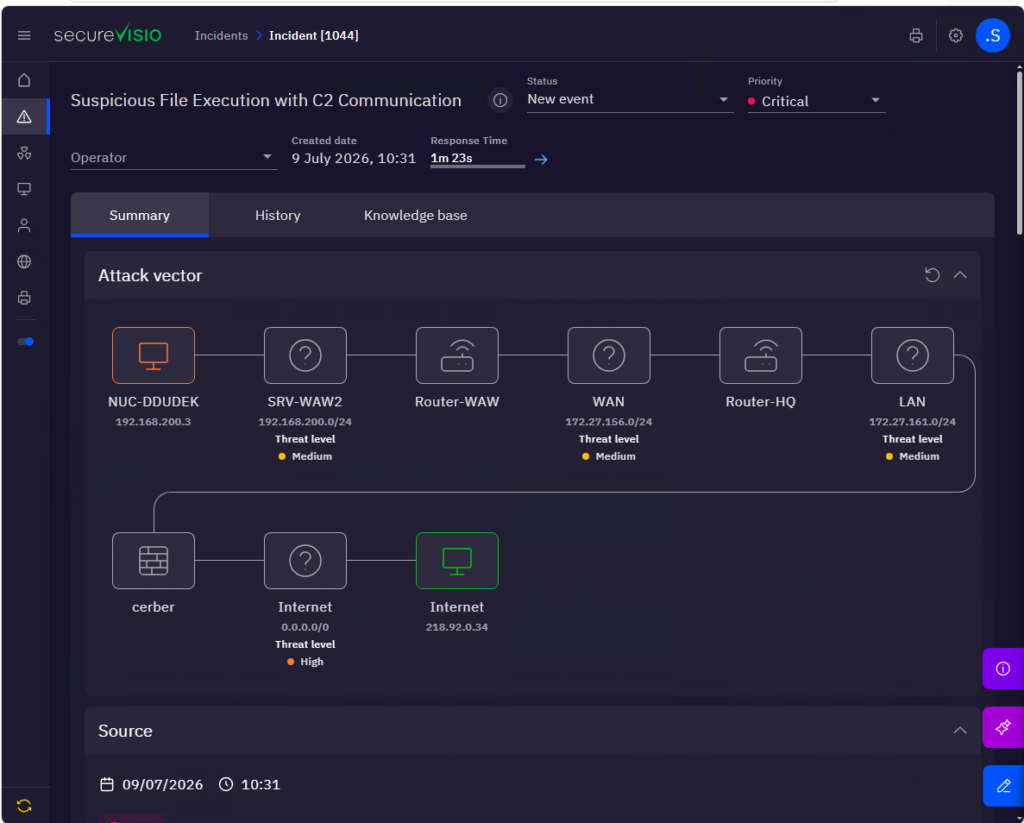
Figure 1 Attack vector on the incident card
Does the CMDB database have to be built manually?
This is one of the questions most frequently asked by organisations starting to work with SecureVisio. The answer is: no.
SecureVisio automates the process of building the CMDB database by means of dedicated detection rules delivered right at the beginning of the system implementation. The rules analyse data coming in from various sources, such as firewalls, EDR systems, network devices or other log sources. On the basis of the information gathered, the system automatically identifies new assets, adds them to the CMDB database and supplements their description with additional technical and business information.
The second data source used to build the context is vulnerability scanners. Thanks to the bidirectional integration, SecureVisio can use the results of Discovery scans to automatically create and update the CMDB database. This makes it possible to keep the documentation of the environment up to date without the need for manual administration.
A few words about the AI Assistant
SecureVisio enables integration with language models compatible with the OpenAI interface. This means it is possible to use both commercial models and locally run open source models such as Gemma or Qwen. Depending on the requirements of the organisation, communication with the model can take place locally or using cloud services. An additional mechanism that increases security is the anonymisation of the data passed to the AI models.
The system also provides ready-made models and configurations via the SVCenter service, from which users download SecureVisio updates, new security rules, parsers and other system components.
The AI Assistant has a set of ready-made prompts intended for various applications. They cover the analysis of incidents, vulnerabilities, logs and events, and they also support operators in creating correlation rules and script actions and in automating security processes.
Practical use of AI mechanisms in the context of an incident
An example of the application of the described functions is the incident “Suspicious Log Truncation”, which was detected automatically by the system.
In the subsequent stages of the analysis, the operator can use the information gathered in the context, the results of the UEBA module and the recommendations prepared by the AI Assistant. The combination of these three sources of information makes it possible to assess the nature of the event much more quickly, reduce the number of false alarms and take the appropriate actions related to incident handling.
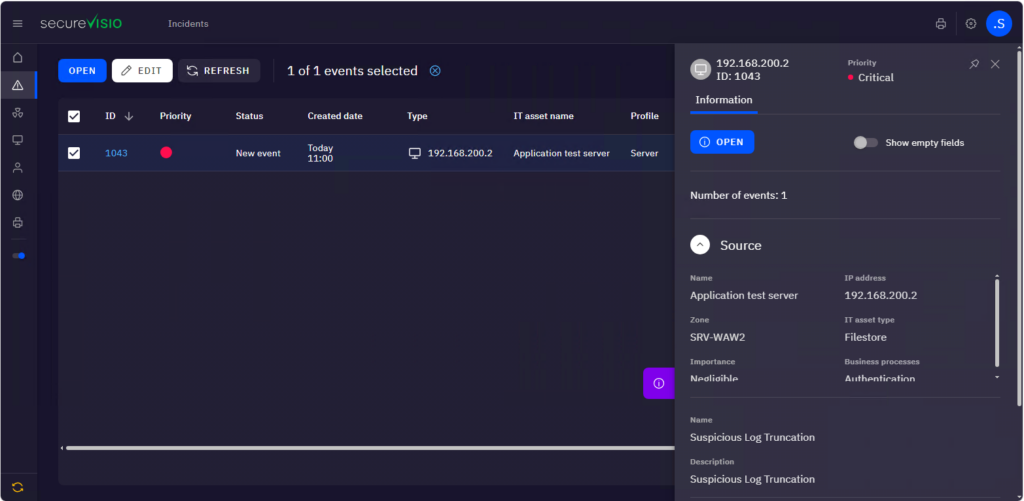
Figure 2 Form of potentially incident-related events
After the event was detected, SecureVisio automatically assigned it a critical priority. This assessment was carried out without the involvement of the operator, on the basis of three basic elements:
- the importance of the asset for the organisation,
- the priority of the security rule that detected the event,
- built-in prioritisation rules taking into account additional business context, e.g. information on whether a critical business process is carried out on the given asset.
Already in the incident list, the operator receives basic information about the asset. The panel on the right-hand side presents the most important contextual data, such as the security zone, the asset type, its name and its level of importance for the organisation.
In the example presented, the system indicates that the event concerns an asset located in the SRV-WAW2 security zone, classified as FileStore, with the name Application Test Server. At the same time, the context informs that this is an asset of low business value.
After opening the incident, the operator is taken to the summary view, which is the central place for conducting the analysis.
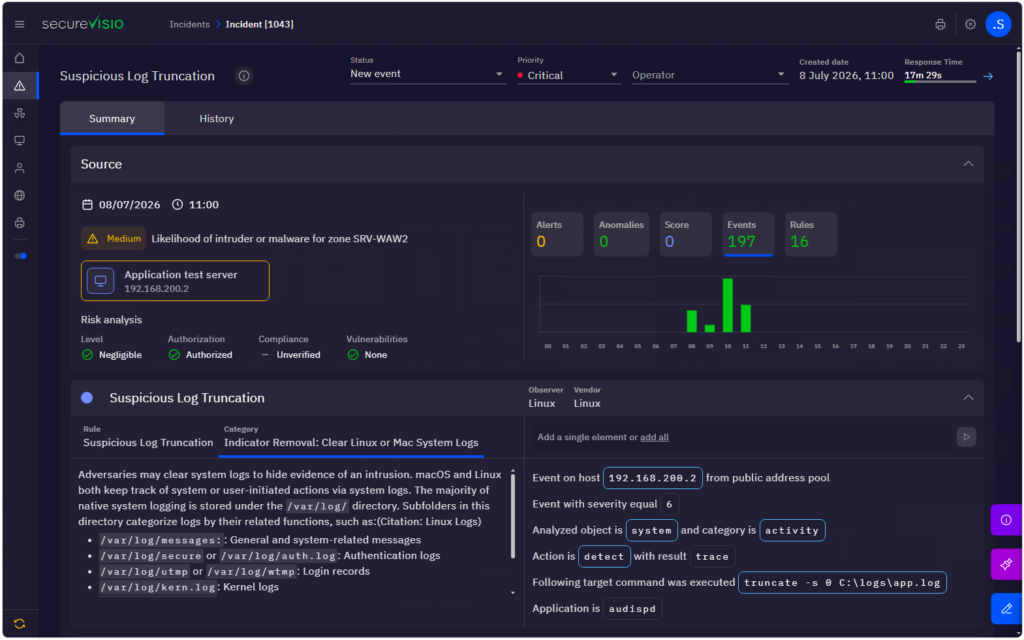
Figure 3 Summary card of the incident event
At this stage, SecureVisio presents the full set of information needed to make a decision. The operator has access to:
- contextual data describing the asset,
- the results of the UEBA behavioural analysis,
- a description of the technique and tactic in line with the MITRE ATT&CK matrix,
- a detailed description of the log generated on the basis of the parsed fields.
The command that was executed deserves particular attention:
truncate -s 0 C:\logs\app.log
This command means that the size of the app.log file was set to zero, i.e. its content was deleted. The information about this operation alone could suggest an attempt to cover the tracks after an attack. However, thanks to the contextual data, the operator knows that the event concerns a test environment of low business importance.
It can therefore be assumed that the log file was cleared during standard work related to application testing and not as a result of the actions of an attacker. Already at this stage, the analysis of the context makes it possible to consider the event a potential false alarm.
Such an assessment can additionally be verified with the help of the AI Assistant.
Step 1. Passing the incident information to the AI Assistant
The operator uses a ready-made prompt intended for incident analysis. The Assistant receives the full set of information gathered by SecureVisio, including the description of the event, the contextual data and the technical information about the log.
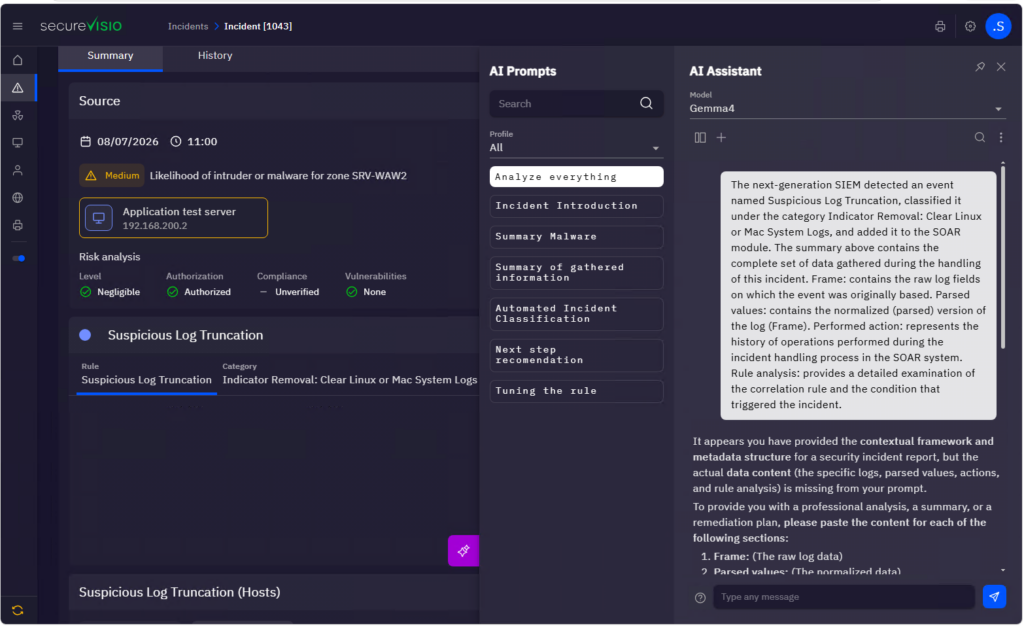
Figure 4 Passing data to the AI Assistant
Step 2. Automatic summary of the incident
The AI Assistant analyses the gathered information and prepares a clear summary covering the course of the event, the risk assessment and the most important observations, so that the operator does not have to analyse all the details of the log independently.
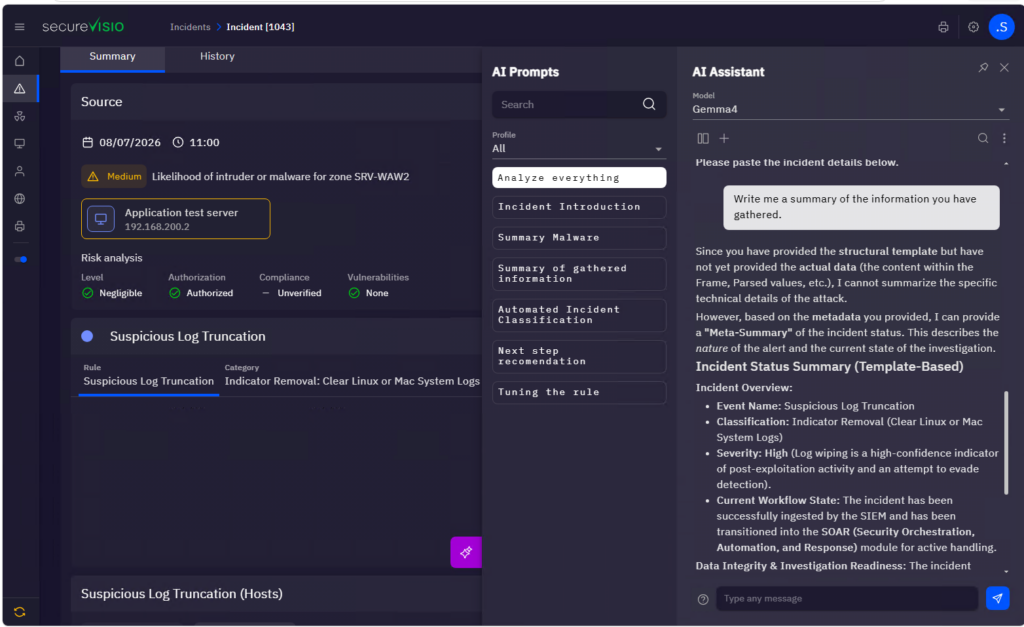
Figure 5 Automatic summary of the incident
Step 3. Assessment of the nature of the event
In the next step, the operator can ask the Assistant to assess whether the analysed event should be treated as a real security incident or as a false alarm.
The AI takes into account both the technical information and the business context gathered in the system, presenting the justification for its recommendation. The final decision still rests with the operator, but the AI significantly shortens the time needed to make it.
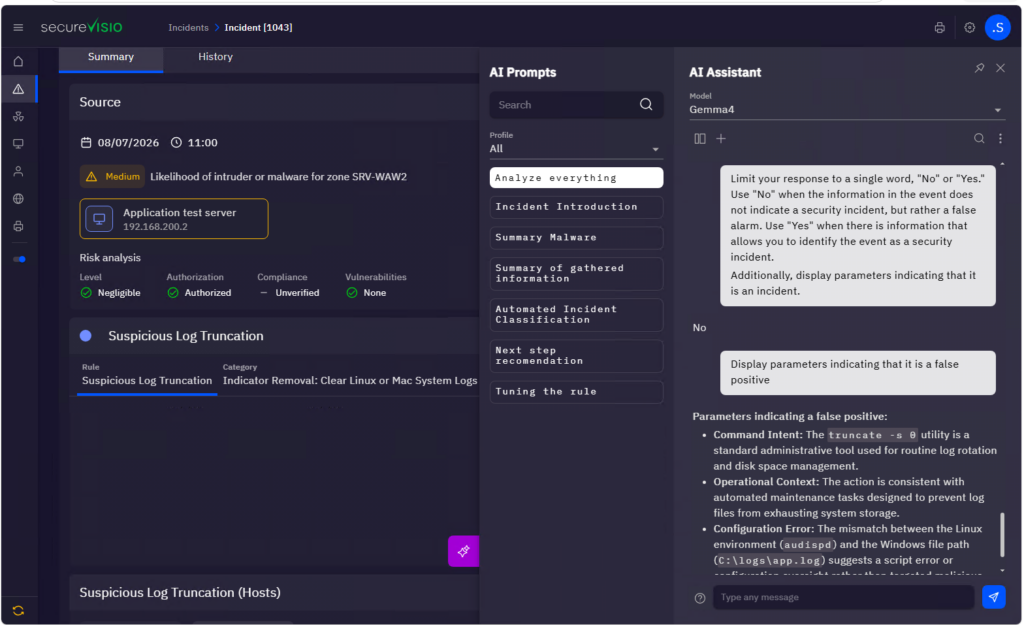
Figure 6 AI recommendation regarding the classification of the event
Step 4. Refining the security rule
The final stage can be the analysis of the reason why the false alarm was generated. The AI Assistant is able to propose exceptions or additional conditions that will make it possible to refine the security rule and reduce the number of similar events in the future.
As a result, the operator not only handles the current incident, but also improves the detection mechanisms, increasing the effectiveness of the system.
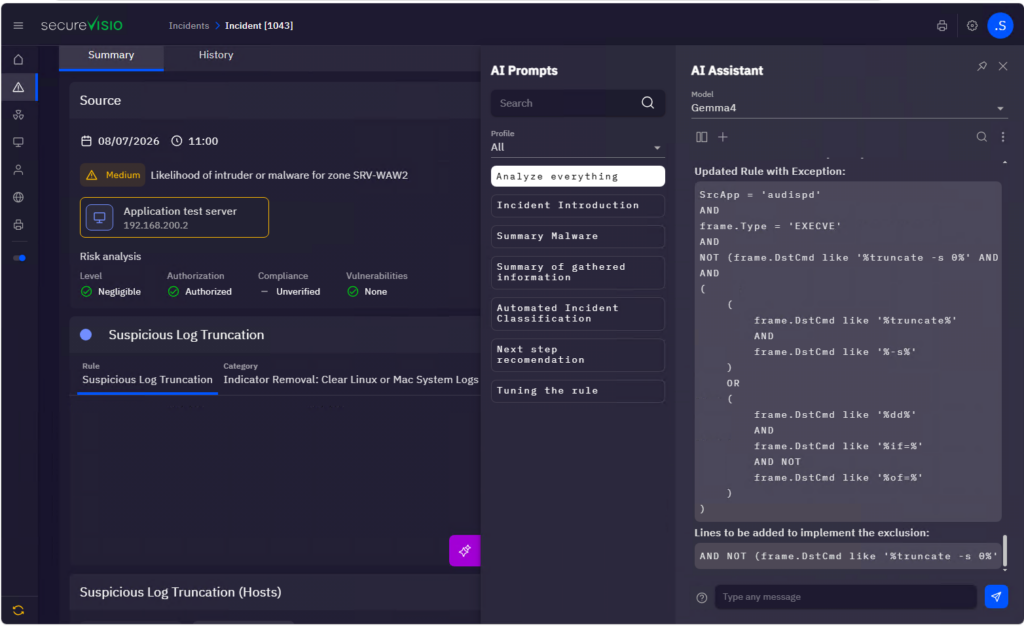
Figure 7 Proposal for modifying the security rule
Conclusions
The example presented shows that combining contextual information with artificial intelligence mechanisms significantly improves the incident analysis process.
The most important observations from the scenario presented are:
- The contextual data made it possible to immediately identify the asset and assess its importance for the organisation.
- The analysis of the parsed log fields made it possible to quickly understand what actions had been carried out on the monitored system.
- The AI Assistant prepared a complete summary of the incident and presented a justified recommendation indicating that the analysed event is most likely a false alarm.
- AI mechanisms can also support operators in improving security rules by proposing exceptions and additional conditions that reduce the number of false alarms.