XDR Vulnerability Management

28.10.2026
Software discovery, CPE/CVE correlation, and endpoint-level vulnerability visibility
Overview
After installation, the XDR agent becomes visible in the SecureVisio Desktop application. In addition to standard host visibility, the agent can provide additional telemetry from the endpoint, including sources such as logs or files configured for collection.
The XDR agent can also support actions executed on demand or as part of SOAR processes. In the vulnerability context, this endpoint presence is important because the system has a host-level anchor for software recognition and follow-up analysis.
SecureVisio can enrich XDR-managed hosts with vulnerability context by combining endpoint telemetry, software identification, CPE dictionary matching, and CVE information. The result is a more practical view of endpoint exposure: analysts can see software detected on an XDR host and review vulnerabilities associated with that software or with findings delivered by integrated vulnerability tools.
- XDR endpoint view: the installed XDR agent is visible in the Desktop application under UEBA > XDR.
- Software inventory: SecureVisio identifies installed software and presents it on the selected XDR host.
- CPE correlation: recognized vendor, product, and version information can be mapped to a Product code (CPE).
- CVE correlation: CVE data is used to retrieve vulnerability information and link it with recognized software.
- Endpoint context: vulnerability information can be shown in the context of the host where the software was detected.
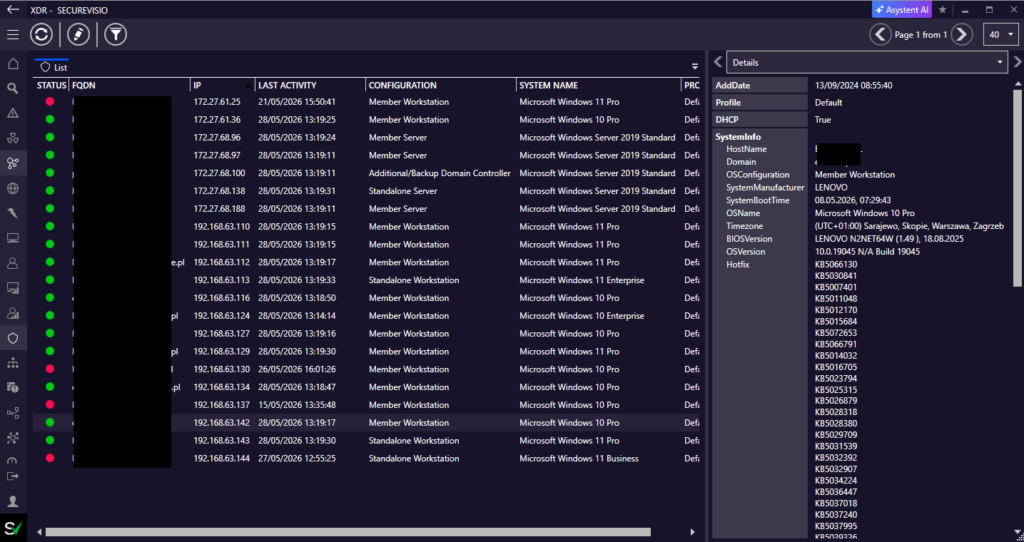
XDR agents are visible in the UEBA > XDR view, with host details available in the side panel.
| Important distinction The mechanism does not only present raw software inventory. It connects endpoint software recognition with vulnerability context, so the analyst can move from a host to its software and then to related vulnerabilities. |
Software recognition and CPE mapping
SecureVisio can recognize software installed on a host with an XDR agent. The recognized software is available after selecting the host and opening the Software tab. This view presents software items together with vendor, product, version, and Product code (CPE) information where a CPE match is available.
The Product code (CPE) is the key technical link between the software detected on the endpoint and vulnerability information from external CVE data. It is derived from the combination of vendor, product, and software version.
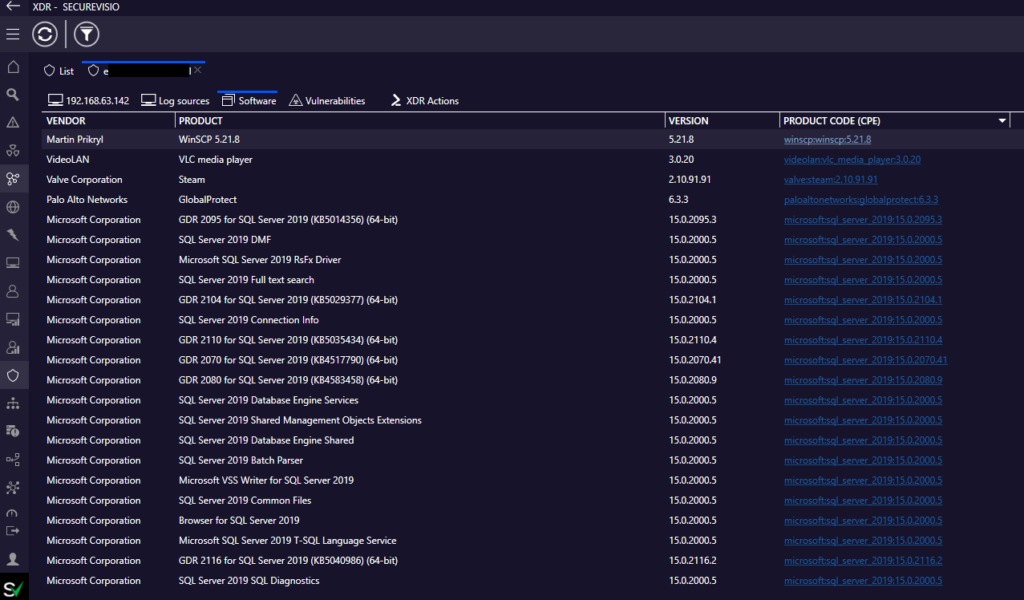
The Software tab shows software recognized on the selected XDR host, including Product code (CPE) values.
| Implementation note The described software collection mechanism uses a basic implementation for gathering installed software information from Windows Registry data. The matching process should therefore be interpreted as software recognition based on available endpoint inventory data, not as a full binary inspection of the host. |
CVE integration and vulnerability creation
SecureVisio also integrates with a CVE dictionary based on the NIST vulnerability database. This enables the system to retrieve vulnerability information and correlate it with software recognized through CPE values.
In practice, SecureVisio can create new vulnerabilities by combining CPE and CVE information. It can also display vulnerabilities for the XDR agent that were identified by other integrated tools.
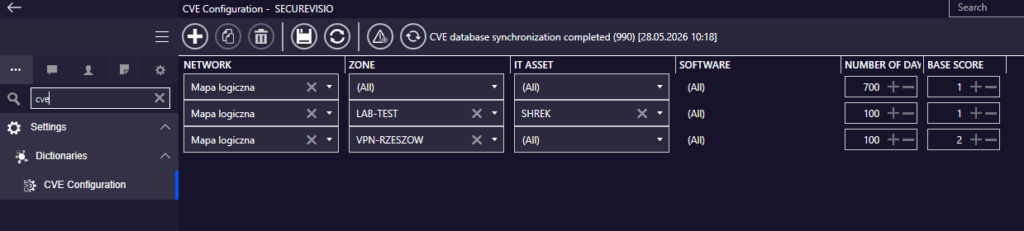
CVE configuration provides the vulnerability data layer used for correlation with recognized software.
| Step | Description |
| 1. Software is detected on the endpoint | The XDR host provides software information gathered from the endpoint. |
| 2. Software is mapped to CPE | Vendor, product, and version are matched against the CPE dictionary. |
| 3. CVE data is consulted | Vulnerability information is retrieved through the CVE/NIST data layer. |
| 4. Vulnerability is linked to the asset context | If vulnerable software is detected, a vulnerability can be created for the group asset associated with the endpoint IP. |
| 5. Endpoint exposure is visible | The vulnerability view can show the endpoint IP addresses where the vulnerable software was detected. |
Where vulnerabilities are shown
The XDR context allows vulnerability information to be presented close to the endpoint where the relevant software was detected. The vulnerability list can show vulnerabilities associated with the selected XDR agent, including vulnerabilities created from CPE/CVE correlation and vulnerabilities detected by other integrated tools.
When vulnerable software is detected on an endpoint, the vulnerability is associated with the group asset linked to that endpoint by IP address. The vulnerability view on the Hosts tab contains the endpoint IP addresses on which the vulnerability was detected.
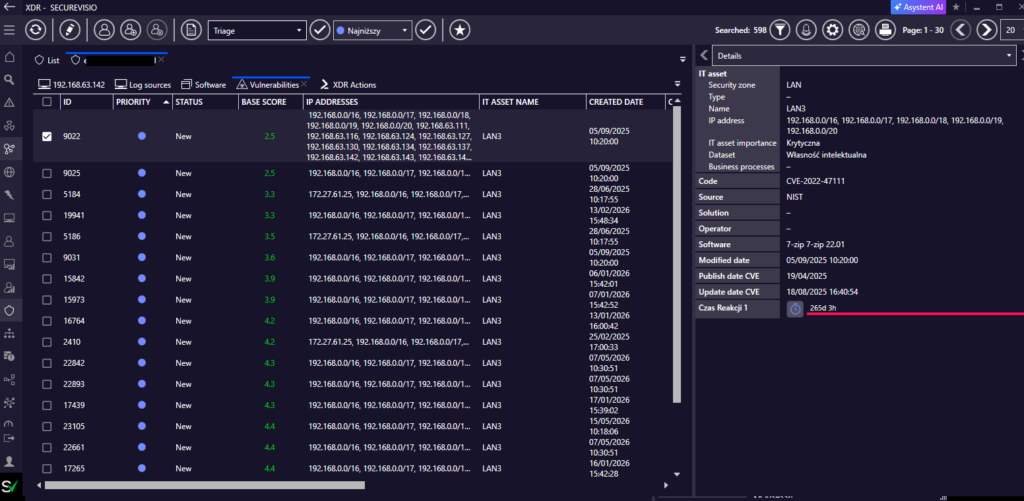
The XDR-related vulnerability view presents vulnerabilities and endpoint context in one place.
Vulnerability lifecycle on XDR endpoints
The vulnerability mechanism checks software installed on XDR endpoints and compares it with software linked to known vulnerabilities. According to the described mechanism, this check is updated once per day.
If vulnerable software is uninstalled or updated on an endpoint, the system can close the vulnerability as self-remediation. If the vulnerable software is detected again later, the vulnerability can be reopened.
| Lifecycle event | System behavior |
| Vulnerable software is detected | A vulnerability can be created in the asset context associated with the endpoint IP. |
| Endpoint IP is linked to the vulnerability | The vulnerability includes information about endpoints on which it was detected. |
| Software is updated or removed | The vulnerability can be closed as self-remediation. |
| Vulnerable software is detected again | The vulnerability can be reopened. |
| Why this lifecycle matters The endpoint vulnerability state can change as software is installed, updated, or removed. A daily refresh and reopen/close behavior makes the view operationally useful for tracking exposure over time. |
Matching method and practical interpretation
The comparison between software detected by XDR and the CPE database uses Lucene search for performance reasons. The index is built during the first search using CPE dictionary data. Manufacturer, software name, and version are treated as separate columns.
The version column is additionally parsed to reduce the risk of common formatting differences, such as using a comma instead of a dot. Lucene calculates a match probability based on the words contained in compared phrases. If the probability is above the defined threshold, the item is treated as a match.
| Matching element | Meaning |
| Manufacturer/vendor | Used as one of the values compared with the CPE dictionary. |
| Product/software name | Used to identify the software family or product. |
| Version | Parsed separately to reduce formatting mismatch risk. |
| Match probability | Used to decide whether the detected software should be treated as matching a CPE entry. |
| Operational interpretation The mechanism is similarity-based rather than a simple exact string comparison. This improves matching flexibility, but analysts should still review important findings in the context of the software, version, endpoint, and resulting vulnerability details. |
Summary
XDR vulnerability handling adds endpoint-level context to vulnerability management. Instead of treating vulnerability information only as a separate inventory or scanner result, SecureVisio can connect it with host telemetry, software recognition, asset context, and operational response capabilities.
SecureVisio uses XDR endpoint context to make vulnerability information more actionable. The XDR agent provides host visibility and software information, CPE matching connects software to standardized product identifiers, and CVE integration supplies vulnerability data. Together, these mechanisms allow vulnerabilities to be displayed in the context of the endpoint and asset where they matter.