UEBA Configuration

28.10.2026
Configuring user and asset profiling, datasets and machine learning in SecureVisio
SecureVisio UEBA uses user and asset profiles to build behavioral baselines and detect activity that deviates from learned patterns. Configuration starts with profiling rules, continues with dataset settings, and then moves to machine learning settings for selected UBA and EBA profiles. The result is a controlled learning process for users and IT assets, based on organization-specific data such as Active Directory attributes and CMDB information from the SecureVisio logical map.
1. Configure profiles and profiling rules
The first configuration step is to prepare profiles and assign profiling rules to them. SecureVisio provides default user and asset profiles, but they can be adjusted or extended to reflect the structure of a specific organization. During implementation, profiles and profiling rules should be reviewed so that the system can classify users and resources in a way that matches operational reality.
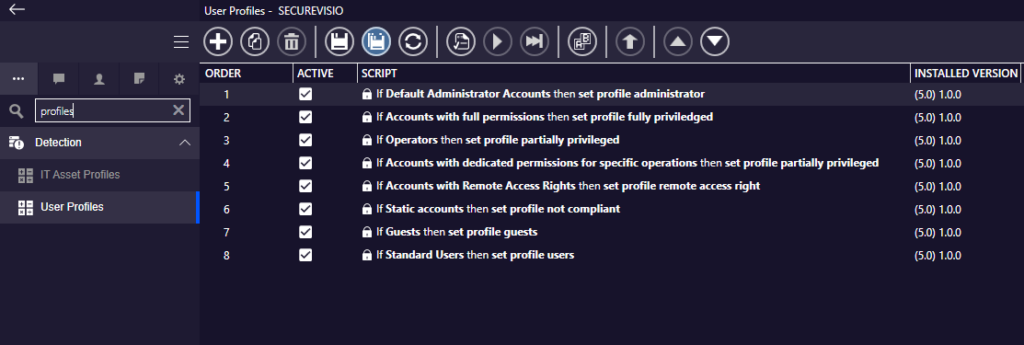
Default user profiles and profiling rules available in SecureVisio.
Profiles can be edited from the profile name editor. The editor displays profile order, active status, default profile selection and a machine learning flag. This makes it possible to decide which profiles should be used for behavioral learning and which should remain informational only.
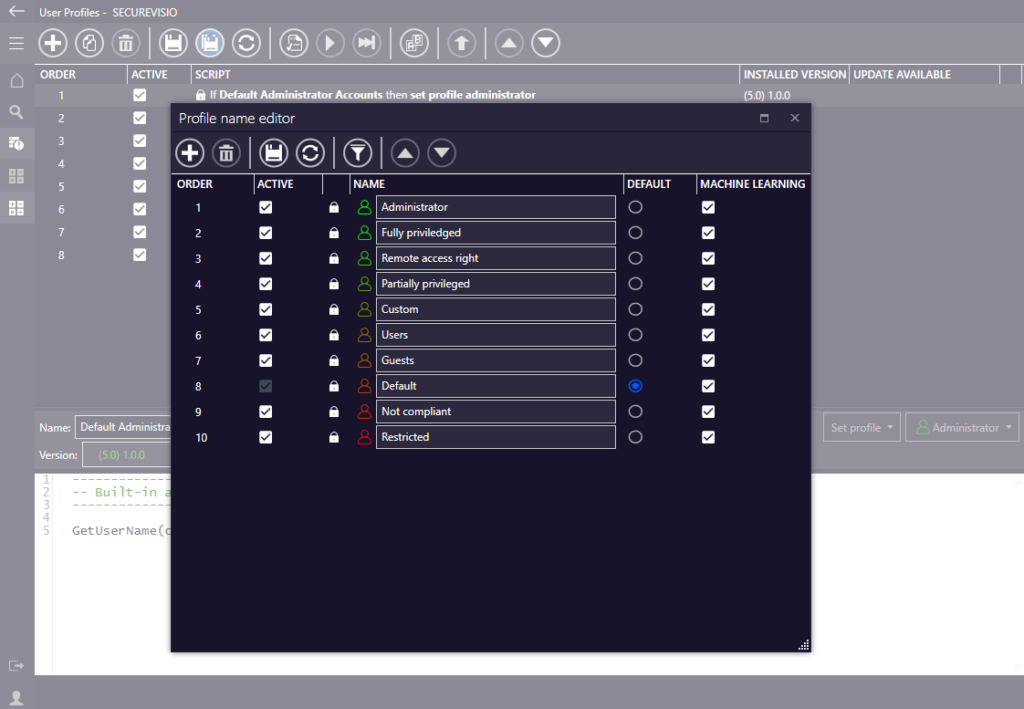
Profile name editor with profile activity, default profile and machine learning flags.
| Profile area | Context used for classification |
| UBA – users | Profiling rules can use information synchronized from Active Directory. If a recognized user matches the rule conditions, the user is assigned to the corresponding profile. |
| EBA – assets | Profiling rules can use SecureVisio CMDB and logical map data. If a recognized asset matches conditions such as security zone or asset attributes, it is assigned to the corresponding profile. |
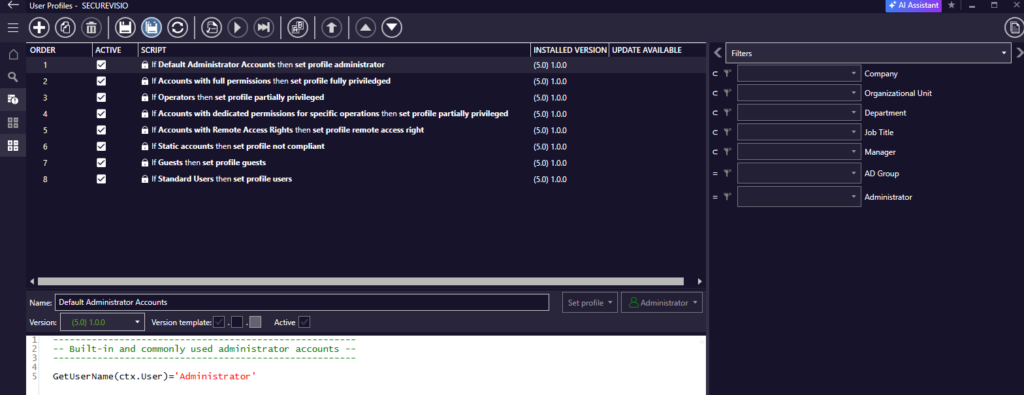
Example user-profile rule using domain-related information.
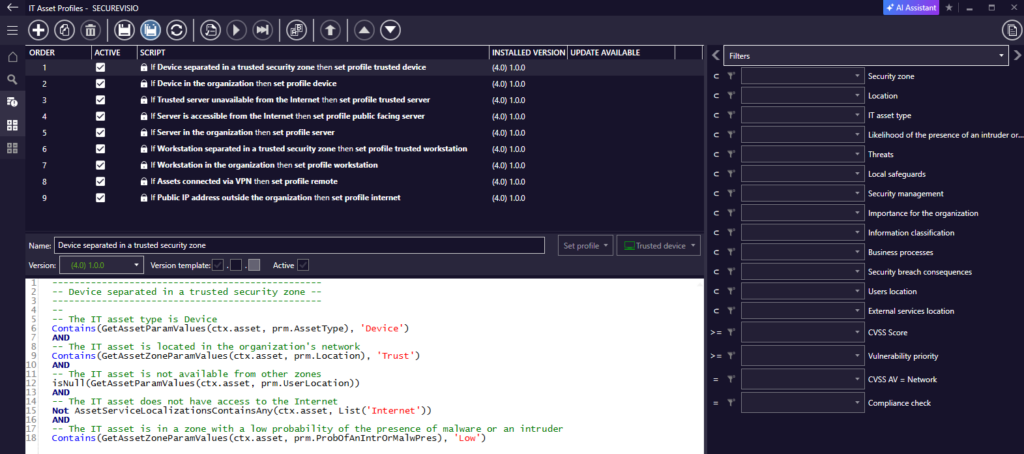
Example asset-profile rule using CMDB and logical-map context.
2. Machine learning configuration
Machine learning configuration is available from the UEBA area, under UBA or EBA. After selecting Configuration of machine learning, the system displays profiles selected for learning, their learning status and the number of algorithms configured for each profile.
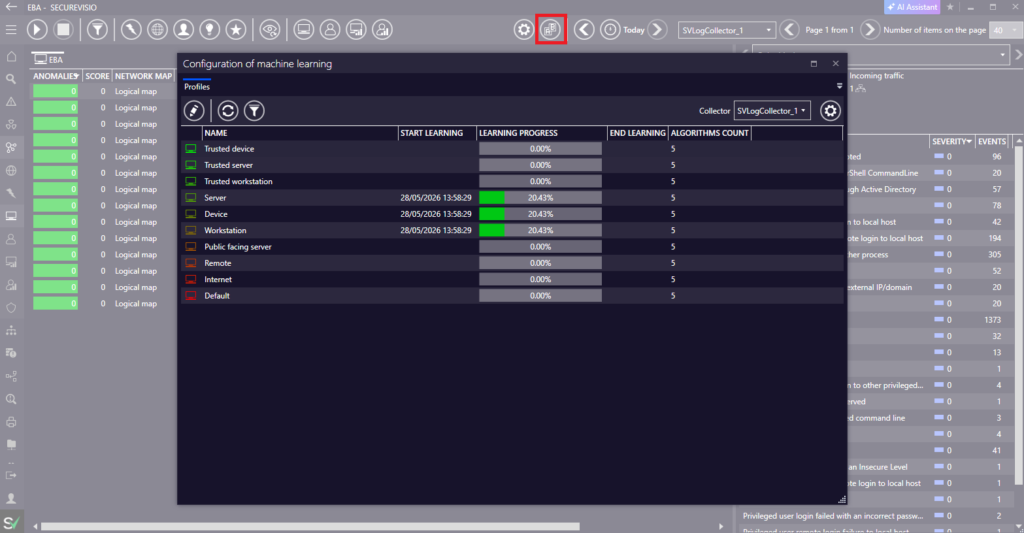
Machine learning configuration window showing profile status and learning progress.
| Before enabling learning Security rules should generate events that are meaningful for behavioral analysis. For UBA, user and domain information should be parsed from logs. For EBA and UBA, the relevant resource and user profiles should already exist. |
The learning process is profile-based. SecureVisio builds a behavior pattern for each selected user or asset profile. Anomalies may be generated during the learning process, but the most reliable results are achieved after the configured learning period or required number of samples has been completed.
3. Configure the learning dataset
Dataset configuration defines what data will be used by machine learning. The configuration is opened from the machine learning window and contains settings for learning rules, time intervals and dataset storage. Changes should be planned carefully, because saving dataset configuration resets the dataset and starts learning again.
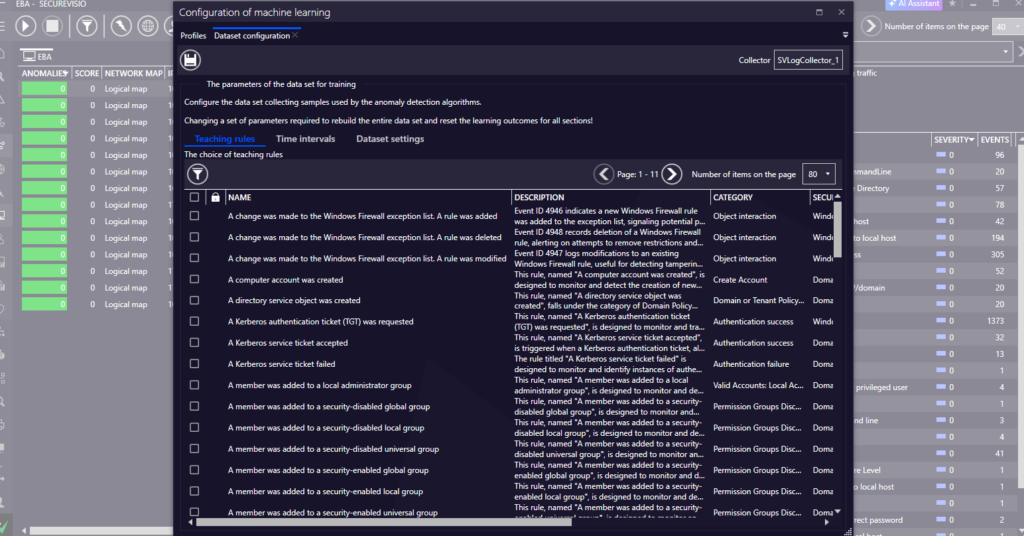
Dataset configuration – selecting learning rules used to collect training data.
| Dataset tab | Purpose |
| Learning rules | Selects which security rules should participate in machine learning. If no specific rules are selected, all applicable rules are considered. |
| Time intervals | Splits learning into independent time ranges, such as working hours, after-hours activity or night-time activity. |
| Dataset settings | Defines the maximum storage size reserved for the learning dataset. |
Time intervals allow the same profile to be learned separately in different parts of the day. If no intervals are configured, the system treats the whole day as a single interval. The standard sample interval is one hour; the system verifies whether data for that period is continuous before saving the sample.
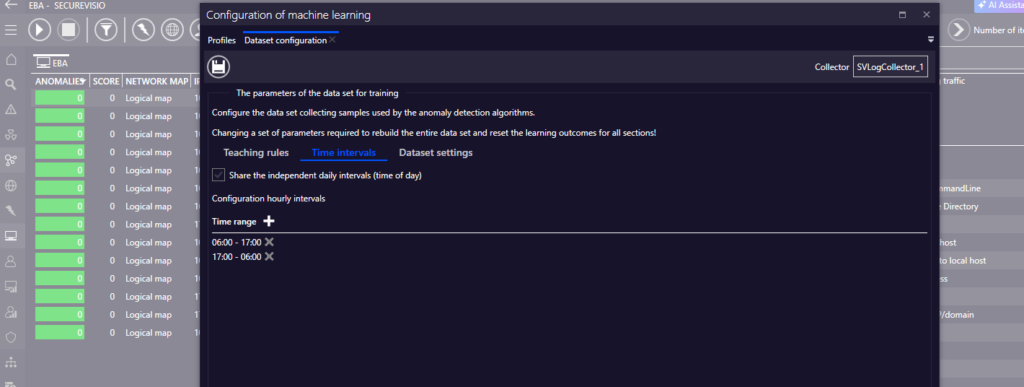
Dataset configuration – time intervals used to split learning into separate ranges.
Dataset size limits prevent training data from growing indefinitely. The configured size is used for the collected samples and is shared between profile partitions and configured intervals.
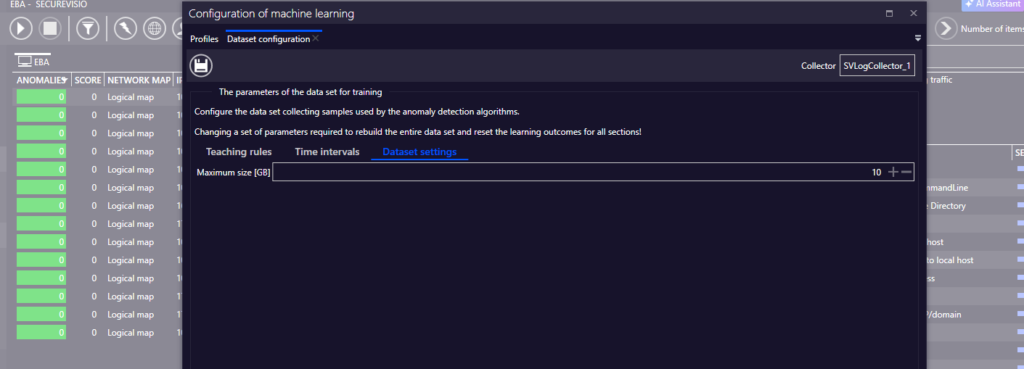
Dataset configuration – maximum dataset size setting.
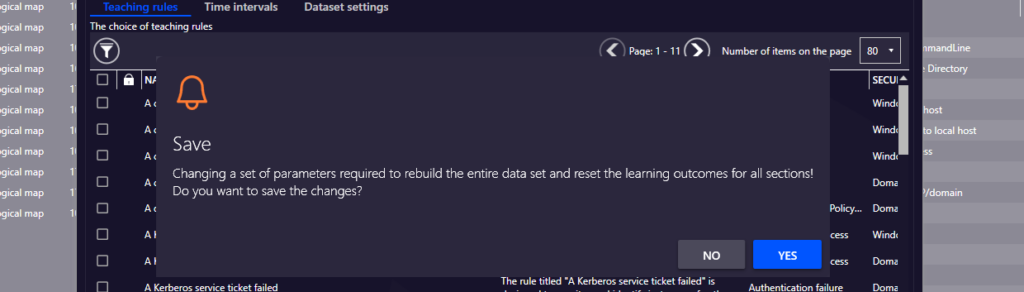
Saving dataset configuration resets the learning dataset.
4. Adjust profile algorithms
After dataset configuration, return to the profile list and open the selected profile. The profile view shows the algorithms used for learning, their learning progress and the end of learning when the process is completed. Algorithm parameters can then be adjusted for the profile.
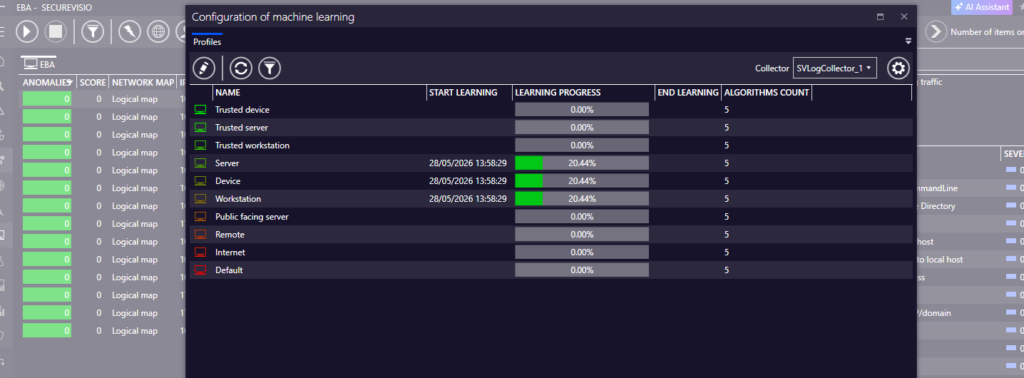
Profile algorithm list with learning progress and algorithm count.
Typical parameters include the number of samples, minimum learning time and deviation or anomaly threshold settings. The exact parameters depend on the selected algorithm type. The system also provides built-in algorithms, including Limiter and Detector-based mechanisms, which are created automatically with the learning dataset.
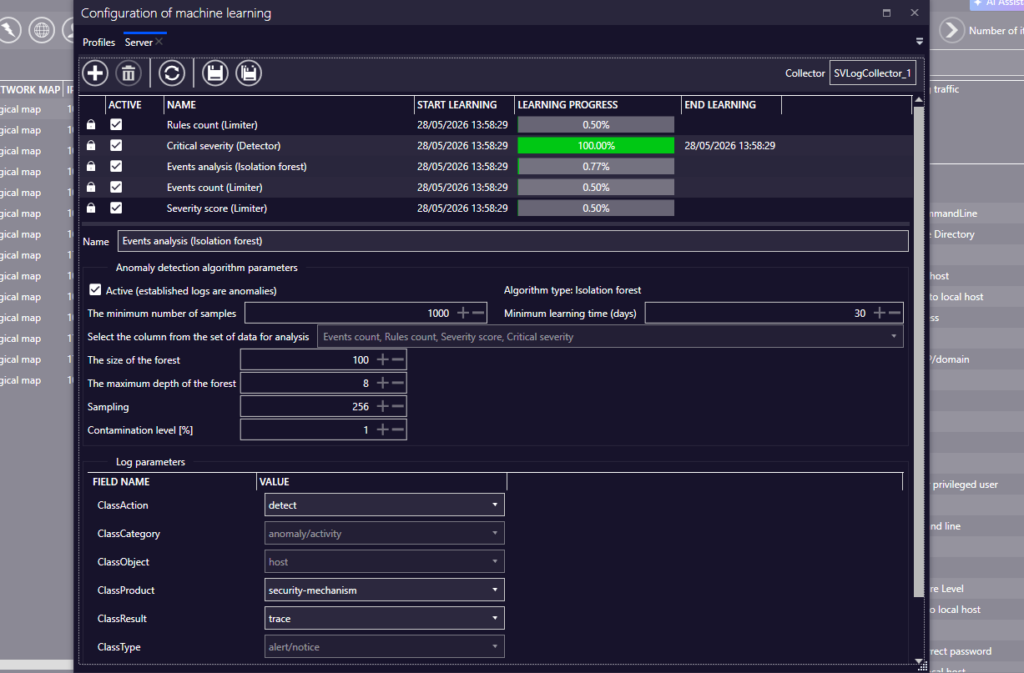
Example algorithm configuration with learning and log parameters.
| Configuration area | Meaning |
| Training parameters | Define how long and how much data is required before the profile can be treated as learned. |
| Anomaly threshold | Controls which deviations from the learned behavior should be reported as anomalies. |
| Log parameters | Define the values used when anomaly logs are generated by the system. |
Additional algorithms can be added for a profile when the built-in set is not sufficient. The available algorithm types include options such as Cluster, Detector, Diff Values, Isolation Forest and Limiter, depending on the selected profile and configuration context.
Adding an additional algorithm for a selected machine learning profile.
5. Machine learning recalculation
Machine learning algorithms can be recalculated automatically after the initial learning configuration has been completed. Recalculation allows the learned behavioral model to be refreshed according to a defined operational cycle.
The recalculation cycle can be configured using daily, weekly or monthly scheduling. In a daily configuration, recalculation is performed every day. In a weekly configuration, the operator selects the days of the week on which recalculation should run. In a monthly configuration, the operator defines the day of the month on which recalculation should be executed.
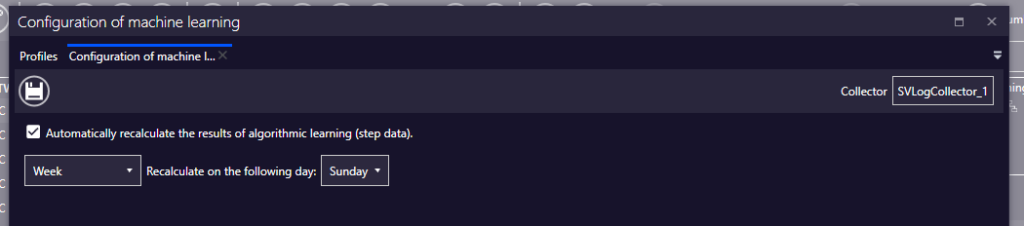
Machine learning recalculation.
6. Operational behavior
After learning is completed, SecureVisio compares new activity against the learned behavior pattern. When the system detects a deviation, the anomaly detection component generates anomaly log frames. These frames are sent for further processing and can be found in the log viewer, correlated, aggregated and used by security rules to create events.
| Operational note In distributed LogCollector deployments, behavioral analysis can be handled by the LogAnomalyDetector component. This allows anomaly detection to be separated from other LogCollector functions when load or architecture requires it. |
Anomaly data is stored separately from the learning dataset. The dataset has a retention mechanism based on configured size limits, while detected anomalies are kept in a dedicated anomaly data structure and can be queried through the appropriate API filters.
Recommended configuration sequence
- Review and adjust UBA and EBA profiles.
- Assign profiling rules based on Active Directory and CMDB/logical-map context.
- Enable machine learning only for profiles that should build behavioral patterns.
- Configure the dataset: learning rules, time intervals and size limit.
- Save the dataset configuration and let profiles complete learning.
- Review profile algorithms and adjust parameters only where the default behavior is not sufficient.