
Automatic security policy matching

28.10.2026
Assigning security policies to newly detected log sources
Overview
After incoming logs are parsed into the SecureVisio schema, they are processed by security rules. Security policies decide which rules are executed for a given log source. For that reason, a security policy is one of the key configuration elements attached to a log source, alongside the parser.
This article continues the automatic source onboarding flow: the parser must be assigned first, and policy matching starts after the source has a parser.
| Important limitation Automatic policy matching is not available for XDR sources. XDR sources are outside the scope of this mechanism. For XDR sources, security policy assignment is handled through preconfigured XDR policy settings. The configuration defines which policy should be attached to newly created XDR sources, so when a new XDR source is created, the appropriate policy should be assigned immediately based on that configuration. |
Manual and automatic assignment modes
The assignment mode is controlled by the policy configuration option for source assignment. The source document describes two modes:
| Mode | Meaning |
| Manual | The policy can be assigned to a log source only by an operator. |
| Automatic | The policy can be assigned manually and can also participate in the automatic matching process. |
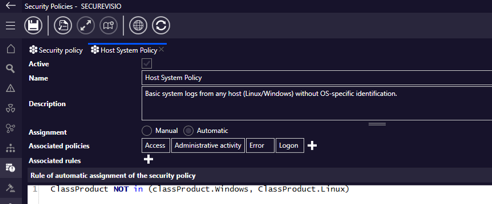
Security policy configuration with source assignment mode and related policies/rules.
When automatic matching can run
- Initial automatic policy selection can be performed for a new device within a maximum of 6 hours after the device is added.
- The process works only for sources that already have a parser assigned. Parser detection happens first; policy matching follows.
- Policy selection starts after receiving 1000 frames for the source, or after receiving at least 50 frames within one hour.
- Matching is based on the script configured for policies that allow automatic assignment to sources.

Example of a policy usage rule script used by the matching process.
Matching mechanism
The matching algorithm evaluates automatic policies in a defined order and assigns the policy that best matches the observed frames.
- For each automatic policy, the system counts related security rules, including rules linked through child policies.
- Policies are sorted in descending order by the number of related rules. Policies with more related rules have priority in the evaluation order.
- Each parsed frame runs the script defined on the policy. Policies are evaluated from the top of the sorted list.
- When a frame matches a policy script, matching for that frame stops and lower-priority policies are not evaluated for that frame.
- After the required number of frames is collected, the policy with the highest number of frame matches is assigned to the source.
- If multiple policies have the same number of matches, the policy higher in the sorted list wins.
| Policy | Related rules | Matched frames | Result |
| POLICY 2 | 10 | 10 | |
| POLICY 3 | 8 | 20 | Winner |
| POLICY 1 | 6 | 20 | |
| POLICY 4 | 2 | 0 |
Informational frame after assignment
After a policy is assigned to a device or log source, the system generates an informational frame on the device. The source example shows the generated frame with parsed fields such as ClassAction, ClassCategory, EventDescription, EventName, Message, SrcIp, VendorName and VendorProduct.
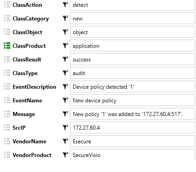
Example of an informational frame generated after policy detection.
Resetting the mechanism
Policy matching is not strictly a one-time mechanism. When a policy is detached from a log source and the list or detail form is saved, the reset date is written in the background. The detection process then starts again for sources with that reset date.
To detach a policy from a source, the operator uses the X control in the policy cell or the same control in bulk editing.

Bulk edit view showing policy removal control used to reset policy matching.