What Does AI-Powered Alert Triage Look Like?

21.07.2026
Alert triage in SecureVisio – effective classification as the foundation of security
SOC operators analyse hundreds and often thousands of alerts every day in order to single out the ones that may genuinely indicate a security incident. In practice, the greatest challenge is not detecting an event, but classifying it correctly and taking the appropriate action quickly.
The answer to this challenge is the SOAR module of the SecureVisio system, and more precisely the automatic triage mechanism that is launched immediately after a potentially incident-related event is detected.
SecureVisio has been developing automatic threat classification capabilities for many years. One of the core elements is the integration with external knowledge bases, which makes it possible to check whether the log that initiated the event contains indicators of compromise (IoC). If they are confirmed, the system can automatically change the status of the ticket from a potential event to a security incident and start the response process.
In the latest version, SecureVisio 6.0, the triage layer has been extended with an AI Assistant that uses predefined prompts. As a result, the classification process has been enriched with contextual analysis performed by a language model.
This article presents the standard triage process in SecureVisio and the way it has been extended with the use of artificial intelligence. At the end, examples of real event classification with the AI Assistant are also presented.
Why is triage so important?
During SecureVisio deployments we encounter both extensive SOC teams and small teams of only one to three operators. Regardless of the size of the organisation, the system should support analysts at the very first stage of handling a ticket, helping to distinguish real incidents from irrelevant events or false alarms.
In the standard SecureVisio configuration, triage is performed automatically by means of handling playbooks launched directly after an event is created. The operator can also start the classification process manually, and the system offers an automatic activity resumption mechanism that allows a ticket to be analysed again after a defined period of time.
Automatic activity resumption
The automatic activity resumption mechanism makes it possible to define an idle time after which the system will run the selected handling playbook again.
Most often this functionality is used as part of an escalation plan. It not only allows the relevant people to be informed about the lack of response to a ticket, but also automatically repeats the analysis of the event. As a result, SecureVisio can verify once more whether IoC indicators or other information have appeared in external knowledge sources since the first analysis.
SVBot – automation of the incident handling process
Automatic triage is the first stage of incident handling, but SecureVisio goes one step further and offers the possibility of fully automating the response using SVBot – a virtual operator responsible for executing SOAR playbooks.
SVBot can use information gathered in PAM, among other sources, and perform automated response actions in line with the prepared procedures.
In the context of triage, SVBot is responsible for launching playbooks that analyse external data. It verifies information in solutions such as:
- BarracudaCentral,
- Cisco Talos,
- FortiGuard,
- urlscan.io,
- ThreatMiner,
- URLHaus
- and many other Threat Intelligence sources.
Based on the results obtained, the system can automatically change the status of the ticket to a security incident and move on to the subsequent stages of the response process.
Triage supported by the AI Assistant
In SecureVisio 6.0 the triage process has been extended with the use of an AI Assistant operating on the basis of predefined prompts.
The model analyses contextual information about the event as well as data obtained from external knowledge bases. It then prepares answers that can be used during the automatic classification of the ticket or support the operator in making a decision.
The AI Assistant configuration makes it possible to:
- maintain a continuous conversation context,
- start new conversations with a custom prompt,
- attach the latest frames related to the incident,
- pass on the results of earlier actions,
- use the event history,
- analyse detection rules,
- save answers to a clipboard that can be used by subsequent steps of SOAR playbooks.
A few words about the AI Assistant
SecureVisio is compatible with OpenAI, which means it can work with both commercial models and open source models such as Gemma or Qwen.
The models can be run locally or in the cloud. When external services are used, it is possible to apply mechanisms for anonymising the data passed to the AI model.
The system also provides ready-made models and prompt sets available through the SVCenter service, from which users download SecureVisio updates, security rules, parsers and the remaining system components.
A set of ready-made prompts has been prepared for administrators, covering among others:
- incident analysis,
- vulnerability analysis,
- log analysis,
- event classification,
- support for creating detection rules,
- generation of script actions.
An example of real use of the AI Assistant during triage
In the example presented, a ticket named “Suspicious File Execution with C2 Communication” was created in the SecureVisio system.
After standard triage was performed and information was verified in external Threat Intelligence databases, the playbook was passed on to the AI Assistant.
Figure 1 Ticket created in the SecureVisio system
Step 1. Decision – are we dealing with an incident?
The first prompt answers only one question:
Does the collected information indicate a security incident?
The model analyses, among other things:
- the process that was launched,
- the name and location of the file,
- the user and host context,
- the parent process,
- network communication,
- connections to external addresses,
- DNS queries,
- persistence attempts,
- data transfer,
- IoC reputation,
- the time correlation of events.
The model’s answer is limited to a single word:
yes or no.
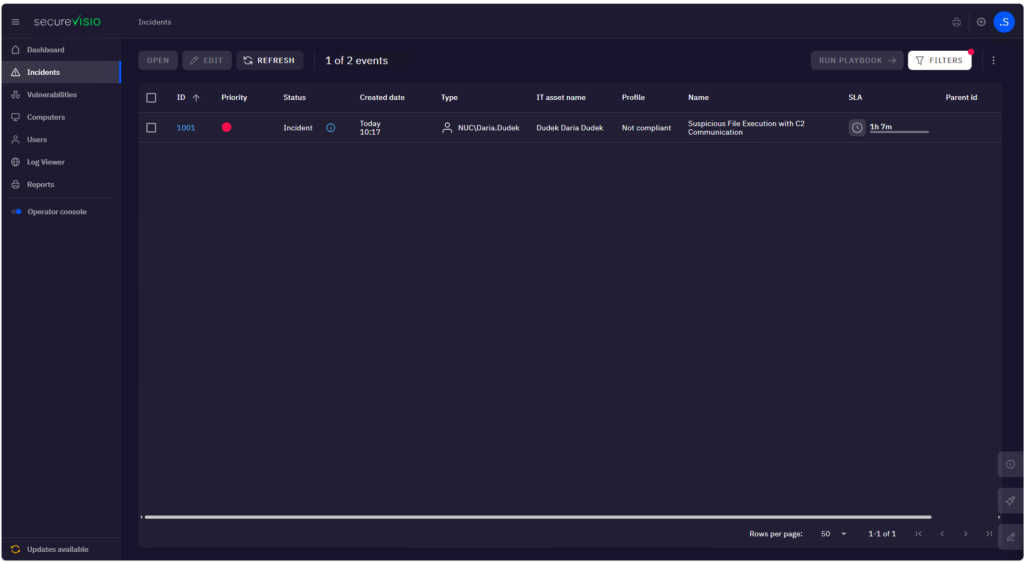
Figure 2 AI Assistant decision
In the case presented, the model returned the answer “yes”, which is unambiguous information for the operator that the analysed ticket should be treated as a security incident and not as a false positive.
Step 2. Recommendation of further action
Once the incident has been confirmed, a second prompt is executed, whose task is to prepare a recommendation for the next step for the SOC operator.
Depending on the level of detection confidence, the model may recommend:
- collecting additional information,
- verifying the activity,
- blocking IoC indicators,
- terminating the suspicious process,
- checking persistence mechanisms,
- isolating the host in the event of a confirmed compromise.
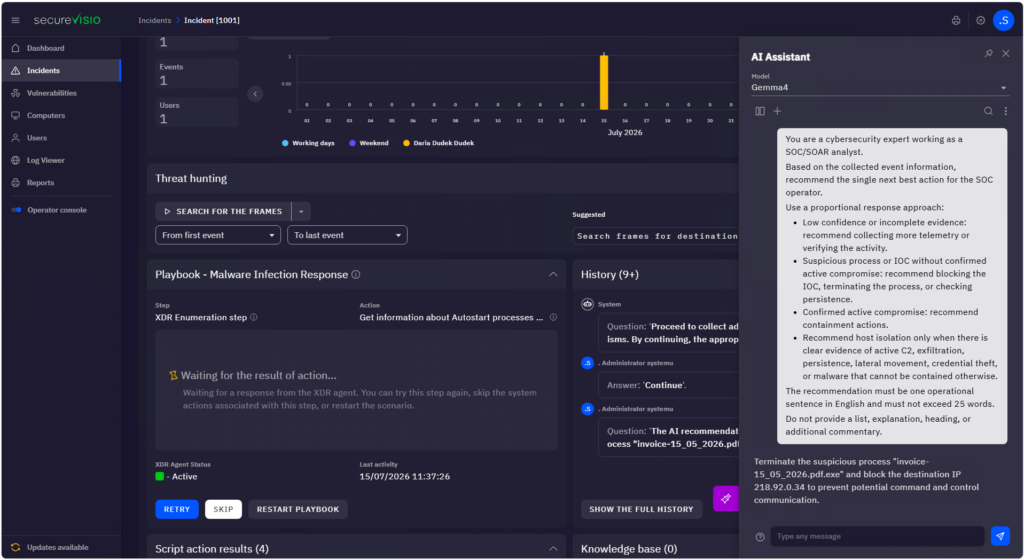
Figure 3 Recommendation of actions
In the example discussed, the answer indicated the suspicious process and the network address that needed to be blocked. On this basis, SecureVisio launched the appropriate response actions and passed the commands to the XDR agents.
Figure 4 Actions performed on the agents
Step 3. Validation of the actions performed
The final stage is the verification of the effectiveness of the response.
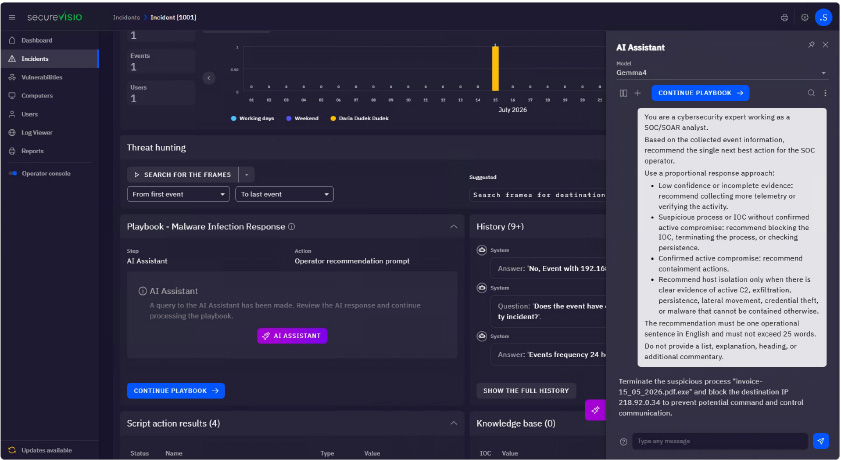
Figure 5 Validation of the actions performed
The AI Assistant analyses the history of the activities recorded during incident handling and assesses whether all the required actions have been carried out correctly.
This makes it possible to automatically verify the completeness of the response process even before the ticket is closed.
Conclusions
Modern SOAR systems increasingly use artificial intelligence not as a replacement for the SOC operator, but as a tool supporting decision making. In the case of SecureVisio, the AI Assistant is a natural extension of the existing triage process, using both contextual data and information originating from Threat Intelligence platforms.
The use of AI makes it possible to shorten the time needed to classify events, standardise the decision-making process and reduce the number of false alarms that require manual analysis. This is particularly important in organisations with small SOC teams, where automation significantly increases the efficiency of the operators’ work.
The example presented shows that using the AI Assistant in three simple steps makes it possible to:
- automatically determine whether the analysed event is a security incident,
- prepare a recommendation of further action for the operator,
- verify that the response carried out was correct.
The combination of classic SOAR mechanisms, integration with Threat Intelligence platforms and the capabilities of language models makes the triage process not only faster, but also more consistent and repeatable. As a result, operators can focus on analysing real threats instead of spending time manually verifying a large number of alerts.
Alert triage in SecureVisio - effective classification as the foundation of securityWhy is triage so important?Automatic activity resumptionSVBot - automation of the incident handling processTriage supported by the AI AssistantA few words about the AI AssistantAn example of real use of the AI Assistant during triageConclusions